A Suspicious Email Could Cost You More Than You Think
The Growing Threat of Email Scams
Email remains one of the most widely used communication channels in organizations today. Unfortunately, it is also one of the most common entry points for scammers. Every day, attackers send fraudulent emails designed to trick recipients into sharing sensitive information, downloading malicious files, or clicking dangerous links.
What makes these attacks successful is not sophisticated technology alone, but the exploitation of human trust and urgency. A seemingly harmless email claiming a prize, requesting urgent action or offering an unbelievable opportunity can persuade even cautious users to act impulsively.
The "Think Before You Click" message serves as an important reminder that every employee plays a critical role in protecting organizational and personal information. A few seconds spent verifying an email can prevent financial loss, data breaches and reputational damage.
How to Identify a Fake Email
Scammers often leave warning signs within their emails. Look for the following red flags:
Unknown Sender
Verify the sender's email address carefully. Fraudulent emails often use suspicious domains or address that mimic legitimate organizations.
Example:
Spelling and Grammar Mistakes
Poor spelling, grammar errors and awkward language are common indicators of phishing emails.
Examples:
- "Receive your raward"
- "Dear Custemer" Too Good To Be True Offers Unexpected rewards, lottery winnings, cashback offers or gifts without any prior participation should immediately raise suspicion.
Urgent or Threatening Language
Attackers create pressure to force immediate action.
Examples:
- "Act within 10 minutes!"
- "Your account will be blocked today!" • "Immediate action required!"
Suspicious Links & Attachments
Hover over links before clicking. If the URL looks unrelated or strange, do not click.
Requests for Sensitive Information
Legitimate organizations rarely ask for passwords, OTPs, banking details, or confidential information through email.
Do's and Don'ts for more safety
DO's
✔ Check the sender's email address carefully.
✔ Verify urgent requests through official channels.
✔ Hover over links before clicking.
✔ Report suspicious emails immediately.
✔ Keep software and security tools updated.
✔ Use strong passwords and Multi-Factor Authentication (MFA).
✔ Think before opening attachments from unknown sources.
DON'Ts
✘ Do not click links from unknown senders.
✘ Do not share passwords, OTPs, or confidential information over email.
✘ Do not download unexpected attachments.
✘ Do not trust emails solely because they contain company logos.
✘ Do not respond to suspicious messages.
✘ Do not act under pressure created by urgency or threats.
✘ Do not ignore suspicious emails; always report them.
Remember
Pause Before You Click If an email:
- Creates urgency
- Promises rewards
- Requests sensitive information
- Comes from an unfamiliar sender
- Contains suspicious links
STOP. THINK. VERIFY.
A few seconds of caution can prevent fraud, protect customer data, and keep both you and the organization secure. Call the National Cyber Crime Helpline at 1930 or file a complaint at Cyber Crime Portal incase of any fraud or scam.
Initiative by ABSLI Digital Jagrukta Abhiyan






 September 24, 2026
 6 mins read


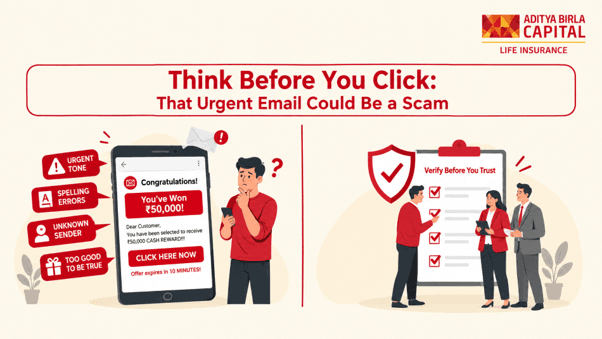
 Table of Contents


 BUY ONLINE